Java IO流
IO 流简介
IO 即 Input/Output,输入和输出。数据输入到计算机内存的过程即输入,反之输出到外部存储(比如数据库,文件,远程主机)的过程即输出。数据传输过程类似于水流,因此称为 IO 流。IO 流在 Java 中分为输入流和输出流,而根据数据的处理方式又分为字节流和字符流。
例如,
- 输入:把文件从磁盘读取到内存;网络读取数据到内存
- 输出:把数据从内存写入到文件;数据从内存输出到网络
抽象基类
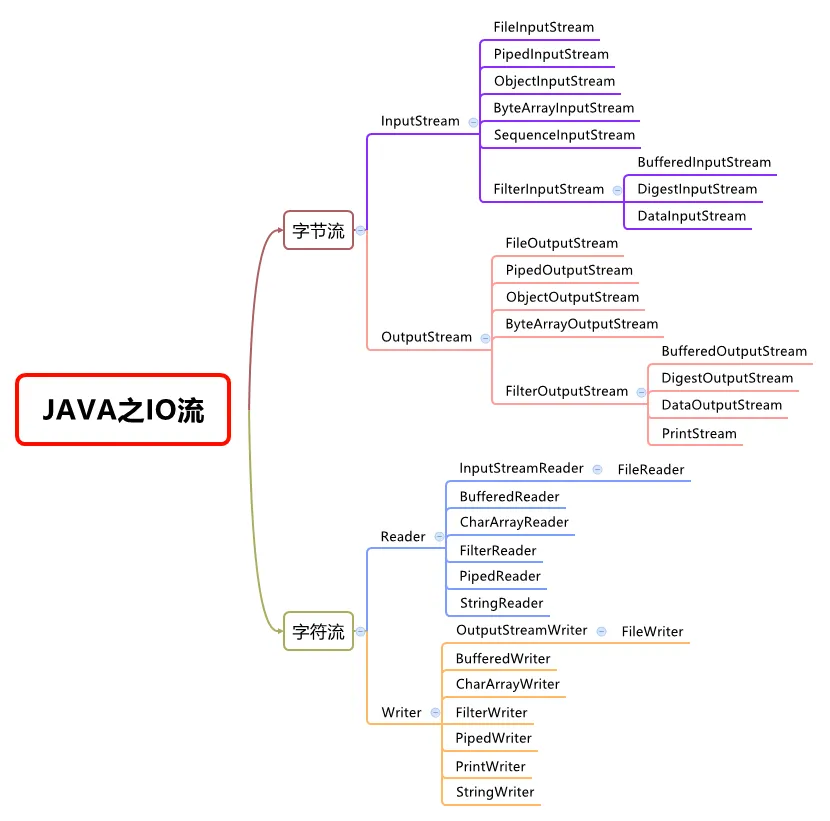
Java IO 流的 40 多个类都是从以下 4 个抽象类基类中派生出来的。
InputStream/OutputStream- IO 流以
byte(字节)为最小单位,因此有的地方也称为字节流。 InputStream代表输入字节流,OuputStream代表输出字节流。
- IO 流以
Reader/Writer- Java 用
Reader和Writer表示字符流,字符流传输的最小数据单位是char。 - 本质上是一个能自动编解码的
InputStream和OutputStream。
- Java 用
字节流
InputStream(字节输入流)
InputStream用于从源头(通常是文件)读取数据(字节信息)到内存中,java.io.InputStream抽象类是所有字节输入流的父类。
InputStream 常用方法:
read():返回输入流中下一个字节的数据。返回的值介于 0 到 255 之间。如果未读取任何字节,则代码返回-1,表示文件结束。read(byte b[ ]): 从输入流中读取一些字节存储到数组b中。如果数组b的长度为零,则不读取。如果没有可用字节读取,返回-1。如果有可用字节读取,则最多读取的字节数最多等于b.length, 返回读取的字节数。这个方法等价于read(b, 0, b.length)。read(byte b[], int off, int len):在read(byte b[ ])方法的基础上增加了off参数(偏移量)和len参数(要读取的最大字节数)。skip(long n):忽略输入流中的 n 个字节 ,返回实际忽略的字节数。available():返回输入流中可以读取的字节数。close():关闭输入流释放相关的系统资源。
从 Java 9 开始,InputStream 新增加了多个实用的方法:
readAllBytes():读取输入流中的所有字节,返回字节数组。readNBytes(byte[] b, int off, int len):阻塞直到读取len个字节。transferTo(OutputStream out):将所有字节从一个输入流传递到一个输出流。
关于**close()**
在计算机中,类似文件、网络端口这些资源,都是由操作系统统一管理的。应用程序在运行的过程中,如果打开了一个文件进行读写,完成后要及时地关闭,以便让操作系统把资源释放掉,否则,应用程序占用的资源会越来越多,不但白白占用内存,还会影响其他应用程序的运行。
A program has to do more than rely on the garbage collector (GC) to reclaim a resource’s memory when it’s finished with it. The program must also release the resoure back to the operating system, typically by calling the resource’s close method. However, if a program fails to do this before the GC reclaims the resource, then the information needed to release the resource is lost. The resource, which is still considered by the operaing system to be in use, has leaked.
InputStream和OutputStream都是通过close()方法来关闭流。关闭流就会释放对应的底层资源。
FileInputStream
FileInputStream是一个比较常用的字节输入流对象,可直接指定文件路径,可以直接读取单字节数据,也可以读取至字节数组中。
1 | |
一般我们是不会直接单独使用FileInputStream,通常会配合BufferedInputStream(字节缓冲输入流,后文会讲到)来使用。
像下面这段代码在我们的项目中就比较常见,我们通过 readAllBytes() 读取输入流所有字节并将其直接赋值给一个 String 对象。
1 | |
ObjectInputStream
ObjectInputStream用于从输入流中读取 Java 对象(反序列化),ObjectOutputStream用于将对象写入到输出流(序列化)。
1 | |
DataInputStream
用于读取指定类型数据,不能单独使用,必须结合其它流,比如 FileInputStream 。
1 | |
OutputStream(字节输出流)
OutputStream用于将数据(字节信息)写入到目的地(通常是文件),java.io.OutputStream抽象类是所有字节输出流的父类。
OutputStream 常用方法:
write(int b):将特定字节写入输出流。write(byte b[ ]): 将数组b写入到输出流,等价于write(b, 0, b.length)。write(byte[] b, int off, int len): 在write(byte b[ ])方法的基础上增加了off参数(偏移量)和len参数(要读取的最大字节数)。flush():刷新此输出流并强制写出所有缓冲的输出字节。close():关闭输出流释放相关的系统资源。
向磁盘、网络写入数据的时候,出于效率的考虑,操作系统并不是输出一个字节就立刻写入到文件或者发送到网络,而是把输出的字节先放到内存的一个缓冲区里(本质上就是一个byte[]数组),等到缓冲区写满了,再一次性写入文件或者网络。
通常情况下,我们不需要调用这个
flush()方法,因为缓冲区写满了OutputStream会自动调用它,并且,在调用close()方法关闭OutputStream之前,也会自动调用flush()方法。但是,在某些情况下,我们必须手动调用
flush()方法。举个栗子:小明正在开发一款在线聊天软件,当用户输入一句话后,就通过
OutputStream的write()方法写入网络流。小明测试的时候发现,发送方输入后,接收方根本收不到任何信息,这是为啥?原因就在于写入网络流是先写入内存缓冲区,等缓冲区满了才会一次性发送到网络。如果缓冲区大小是4K,则发送方要敲几千个字符后,操作系统才会把缓冲区的内容发送出去,这个时候,接收方会一次性收到大量消息。
解决办法就是每输入一句话后,立刻调用
flush(),不管当前缓冲区是否已满,强迫操作系统把缓冲区的内容立刻发送出去。
FileOutputStream
FileOutputStream是最常用的字节输出流对象,可直接指定文件路径,可以直接输出单字节数据,也可以输出指定的字节数组。
类似于 FileInputStream,FileOutputStream 通常也会配合 BufferedOutputStream(字节缓冲输出流,后文会讲到)来使用。
1 | |
ObjectInputStream
ObjectInputStream用于从输入流中读取 Java 对象(ObjectInputStream,反序列化),ObjectOutputStream将对象写入到输出流(ObjectOutputStream,序列化)。
DataOutputStream
DataOutputStream 用于写入指定类型数据,不能单独使用,必须结合其它流,比如 FileOutputStream 。
1 | |
字符流
不管是文件读写还是网络发送接收,信息的最小存储单元都是字节。 那为什么 I/O 流操作要分为字节流操作和字符流操作呢?
- 字符流是由 Java 虚拟机将字节转换得到的,这个过程还算是比较耗时。
- 如果我们不知道编码类型就很容易出现乱码问题。
字符流默认采用的是 Unicode 编码,我们可以通过构造方法自定义编码。
utf8 :英文占 1 字节,中文占 3 字节,unicode:任何字符都占 2 个字节,gbk:英文占 1 字节,中文占 2 字节
Reader(字符输入流)
Reader用于从源头(通常是文件)读取数据(字符信息)到内存中,java.io.Reader抽象类是所有字符输入流的父类。
Reader本质上是一个基于InputStream的byte到char的转换器。
**Reader**常用方法:
read(): 从输入流读取一个字符,读取字符流的下一个字符,并返回字符表示的int,范围是0~65535。如果已读到末尾,返回-1。read(char[] cbuf): 从输入流中读取一些字符,并将它们存储到字符数组cbuf中,等价于read(cbuf, 0, cbuf.length)。read(char[] cbuf, int off, int len):在read(char[] cbuf)方法的基础上增加了off参数(偏移量)和len参数(要读取的最大字符数),返回读取的字符的个数,到达流的末尾则返回-1。skip(long n):忽略输入流中的 n 个字符,返回实际忽略的字符数。close(): 关闭输入流并释放相关的系统资源。
InputStreamReader 是字节流转换为字符流的桥梁,其子类 FileReader 是基于该基础上的封装,可以直接操作字符文件。
1 | |
FileReader 代码示例:
1 | |
输出
1 | |
Writer(字符输出流)
Writer用于将数据(字符信息)写入到目的地(通常是文件),java.io.Writer抽象类是所有字符输出流的父类。
Writer本质上是一个基于OutputStream的char到byte的转换器。
**Writer** 常用方法:
write(int c): 写入单个字符。write(char[] cbuf):写入字符数组cbuf,等价于write(cbuf, 0, cbuf.length)。write(char[] cbuf, int off, int len):在write(char[] cbuf)方法的基础上增加了off参数(偏移量)和len参数(要读取的最大字符数)。write(String str):写入字符串,等价于write(str, 0, str.length())。write(String str, int off, int len):在write(String str)方法的基础上增加了off参数(偏移量)和len参数(要读取的最大字符数)。append(CharSequence csq):将指定的字符序列附加到指定的Writer对象并返回该Writer对象。append(char c):将指定的字符附加到指定的Writer对象并返回该Writer对象。flush():刷新此输出流并强制写出所有缓冲的输出字符。close():关闭输出流释放相关的系统资源。
OutputStreamWriter 是字符流转换为字节流的桥梁,其子类 FileWriter 是基于该基础上的封装,可以直接将字符写入到文件。
1 | |
节点流 & 处理流(包装流)
直接使用继承,为各种InputStream附加更多的功能,根本无法控制代码的复杂度,很快就会失控。
为了解决依赖继承会导致子类数量失控的问题,以 InputStream 为例,JDK 首先将 InputStream分为两大类:
一类是直接提供数据的基础InputStream,例如:
- FileInputStream
- ByteArrayInputStream
- ServletInputStream
- …
一类是提供额外附加功能的InputStream,例如:
- BufferedInputStream
- DigestInputStream
- CipherInputStream
- …
Filter模式/装饰器模式
当我们需要给一个“基础”InputStream附加各种功能时,我们先确定这个能提供数据源的InputStream,因为我们需要的数据总得来自某个地方,例如,FileInputStream,数据来源自文件:
1 | |
紧接着,我们希望FileInputStream能提供缓冲的功能来提高读取的效率,因此我们用 BufferedInputStream包装这个InputStream,得到的包装类型是BufferedInputStream,但它仍然被视为一个InputStream:
1 | |
最后,假设该文件已经用gzip压缩了,我们希望直接读取解压缩的内容,就可以再包装一个GZIPInputStream:
1 | |
无论我们包装多少次,得到的对象始终是InputStream,我们直接用InputStream来引用它,就可以正常读取:
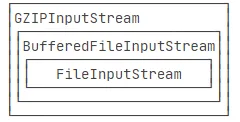
上述这种通过一个“基础”组件再叠加各种“附加”功能组件的模式,称之为 Filter 模式(或者装饰器模式:Decorator)。OutputStream也一样。这样就可以让我们通过少量的类来实现各种功能的组合。
节点流 & 处理流(包装流)
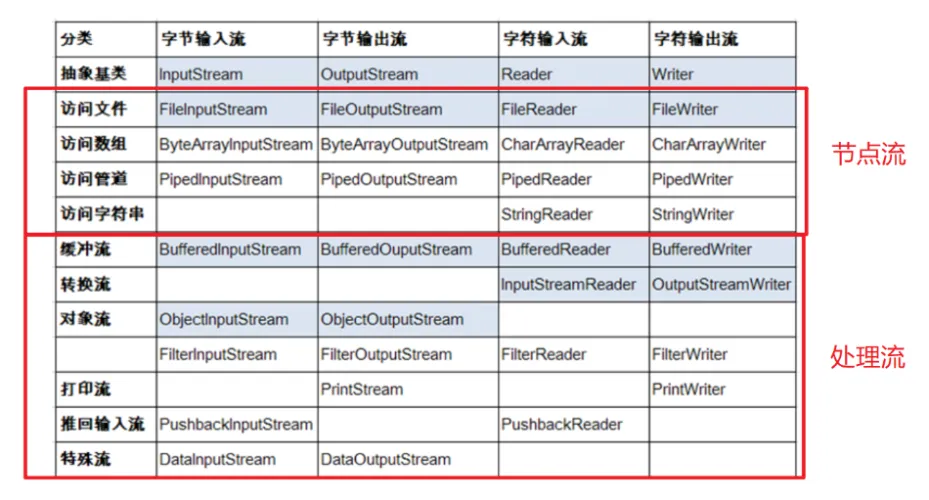
节点流:属于底层流,直接跟数据源相接,可以从一个特定的数据源读写数据。
处理流(也叫包装流):包装节点流,“连接”在已存在的流(节点流或处理流)之上,不会直接与数据源相连,既可以消除不同节点流的实现差异,也可以提供更方便的方法来完成输入输出。
字节缓冲流
IO 操作是很消耗性能的,缓冲流将数据加载至缓冲区,一次性读取/写入多个字节,从而避免频繁的 IO 操作,提高流的传输效率。
字节缓冲流这里采用了装饰器模式来增强 InputStream 和OutputStream子类对象的功能。
举个例子,我们可以通过 BufferedInputStream(字节缓冲输入流)来增强 FileInputStream 的功能。
1 | |
字节流和字节缓冲流的性能差别主要体现在我们使用两者的时候都是调用 write(int b) 和 read() 这两个一次只读取一个字节的方法的时候。由于字节缓冲流内部有缓冲区(字节数组),因此,字节缓冲流会先将读取到的字节存放在缓存区,大幅减少 IO 次数,提高读取效率。
使用write(int b)和read()方法,分别通过字节流和字节缓冲流复制一个524.9 mb 的 PDF 文件耗时对比如下:
1 | |
测试结果:
1 | |
可见,两者耗时差别非常大,缓冲流耗费的时间是字节流的 1/165。
如果是调用 read(byte b[]) 和 write(byte b[], int off, int len) 这两个写入一个字节数组的方法的话,只要字节数组的大小合适,两者的性能差距其实不大,基本可以忽略。
BufferedInputStream(字节缓冲输入流)
BufferedInputStream从源头(通常是文件)读取数据(字节信息)到内存的过程中不会一个字节一个字节的读取,而是会先将读取到的字节存放在缓存区,并从内部缓冲区中单独读取字节。这样大幅减少了 IO 次数,提高了读取效率。
BufferedInputStream 内部维护了一个缓冲区,这个缓冲区实际就是一个字节数组:
1 | |
缓冲区大小默认为8192字节,可以通过BufferedInputStream(InputStream in, int size)这个构造方法来指定缓冲区的大小。
BufferedOutputStream(字节缓冲输出流)
BufferedOutputStream将数据(字节信息)写入到目的地(通常是文件)的过程中不会一个字节一个字节的写入,而是会先将要写入的字节存放在缓存区,并从内部缓冲区中单独写入字节。这样大幅减少了 IO 次数,提高了读取效率。
1 | |
类似于 BufferedInputStream,BufferedOutputStream 内部也维护了一个缓冲区,并且,这个缓存区的大小也是 8192 字节。
字符缓冲流
BufferedReader (字符缓冲输入流)和 BufferedWriter(字符缓冲输出流)类似于 BufferedInputStream(字节缓冲输入流)和BufferedOutputStream(字节缓冲输入流),内部都维护了一个字节数组作为缓冲区。不过,前者主要是用来操作字符信息。
1 | |
BufferedReader类中,有属性Reader,即封装了一个字符输入流,该节点流可以是任意的Reader的子类。查看【图2 - IO流分类】可知,BufferedReader可以处理文件、数组、管道等多种数据源。
打印流
PrintStream 属于字节打印流,与之对应的是 PrintWriter(字符打印流)。 PrintStream 是 OutputStream 的子类,PrintWriter 是 Writer 的子类。
1 | |
PrintStream最终输出的总是byte数据。
我们熟知的System.out实际是用于获取一个PrintStream对象,print方法实际调用的是PrintStream对象的 write 方法。
随机访问流 RandomAccessFile
RandomAccessFile 支持随意跳转到文件的任意位置进行读写。
构造方法如下,我们可以指定 mode(读写模式)。
1 | |
读写模式主要有下面四种:
r: 只读模式。rw: 读写模式rws: 相对于rw,rws同步更新对“文件的内容”或“元数据”的修改到外部存储设备。rwd: 相对于rw,rwd同步更新对“文件的内容”的修改到外部存储设备。
文件内容指的是文件中实际保存的数据,元数据则是用来描述文件属性比如文件的大小信息、创建和修改时间。
文件指针
RandomAccessFile 中有一个文件指针用来表示下一个将要被写入或者读取的字节所处的位置。我们可以通过 RandomAccessFile 的 seek(long pos) 方法来设置文件指针的偏移量(距文件开头 pos 个字节处)。如果想要获取文件指针当前的位置的话,可以使用 getFilePointer() 方法。
RandomAccessFile 代码示例:
1 | |
输出:
1 | |
input.txt 文件内容变为 ABCDEFGHIJK 。
数据覆盖
RandomAccessFile 的 write 方法在写入对象的时候如果对应的位置已经有数据的话,会将其覆盖掉。
1 | |
假设运行上面这段程序之前input.txt文件内容变为ABCD ,运行之后则变为HIJK 。
断点续传
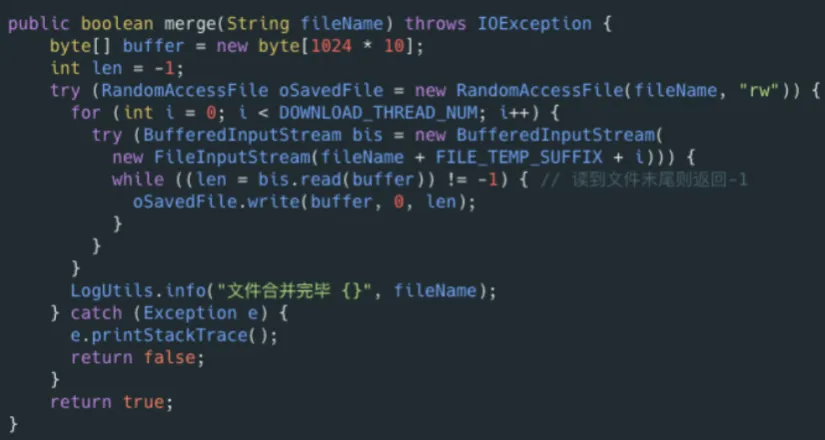
RandomAccessFile比较常见的一个应用就是实现大文件的断点续传。何谓断点续传?简单来说就是上传文件中途暂停或失败(比如遇到网络问题)之后,不需要重新上传,只需要上传那些未成功上传的文件分片即可。分片(先将文件切分成多个文件分片)上传是断点续传的基础。
RandomAccessFile 可以帮助我们合并文件分片,示例代码如下:
RandomAccessFile 的实现依赖于 FileDescriptor (文件描述符) 和 FileChannel (内存映射文件)。
关于流的关闭
使用 Java7 的 try-with-resources 来关闭资源,只需要编写 try() 语句,就可以让编译器自动为我们关闭资源。
《Effective Java》中明确指出:
面对必须要关闭的资源,我们总是应该优先使用 try-with-resources 而不是 try-finally。随之产生的代码更简短,更清晰,产生的异常对我们也更有用。try-with-resources 语句让我们更容易编写必须要关闭的资源的代码,若采用 try-finally 则几乎做不到这点。
1 | |
编译器只看**try(resource = ...)**中的对象是否实现了**java.lang.AutoCloseable**接口,如果实现了,就自动加上finally语句并调用close()方法。InputStream和OutputStream都实现了这个接口,因此,都可以用在try(resource)中。
关闭流只需要关闭最外层
注意到在包装多个流对象的时候,只需要持有最外层,如InputStream,当最外层的 InputStream关闭时(在try(resource)块的结束处自动关闭),内层的InputStream的close()方法也会被自动调用,并最终调用到最核心的“基础”InputStream,因此不存在资源泄露。